4 Best AI Photo Generator Tools in 2026 for Fast, Studio-Quality Headshots
10 min read
A professional headshot still opens doors—more profile views on LinkedIn, quicker credibility in pitch decks, tighter cohesion on an About Us page. But scheduling a photographer drains time, money, and confidence. AI headshot generators fix that: upload a few selfies and, minutes later, download studio-quality portraits.
We tested the leading services for realism, speed, privacy, price, and team features. Below you’ll see how each one scored and why four clear winners stand out.
How AI headshot generators work – and why that matters
Picture an art director who studies hundreds of portraits, learns what flatters each face, and recreates the look on demand. A modern AI headshot generator does the same, but it learns in minutes and produces results while you scroll your inbox.
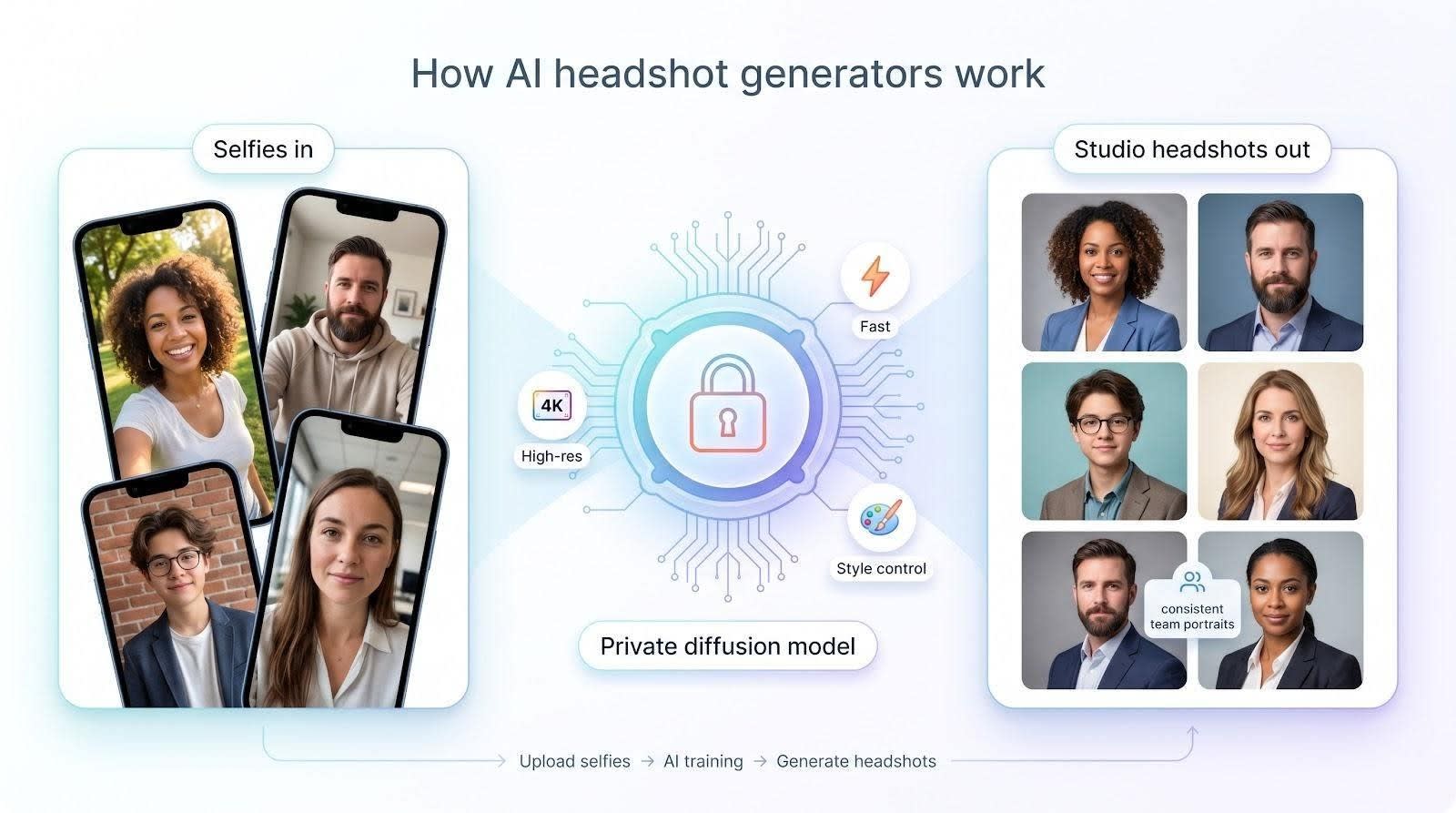
Under the hood, the tools rely on diffusion models. You upload a set of selfies; the system trains a private mini-model that understands your facial geometry, then repaints you inside carefully lit studio scenes. Because the model trains on your own images, outputs stay faithful to your features rather than generic stock art.
Quality has jumped since the first avatar apps. Open-source engines like Stable Diffusion XL pushed resolution past 4K, and “turbo” versions cut processing time from hours to minutes. The best services fine-tune those engines further, locking in skin tone, hair texture, and the subtle asymmetries that make you unmistakably you.
Speed is the other breakthrough. Five selfies and a click once meant an overnight queue. In 2026 most top platforms return a full gallery in under an hour, and some finish in ten minutes, so you can refresh a LinkedIn photo between stand-ups.
Control seals the deal. Want a navy blazer against a soft-gray background? Pick the style before generation or remix the shot afterward. Need an entire global team to share the same lighting and crop? Feed their selfies into one dashboard and get uniform portraits without booking studios in five cities.
In short, AI headshot generators combine studio polish with instant convenience. They compress planning, shooting, and retouching into a single upload button, freeing you to focus on the story your new photo will tell.
How we tested and ranked the contenders
We wanted a ranking you can trust, not a popularity poll, so we built a clear scoring rubric, ran every tool through the same paces, and let the numbers decide.
First, we gathered a diverse set of selfies across gender, skin tone, lighting, and accessories. Each platform received the identical photo bundle, giving every tool the same starting point.
We then measured five factors that matter most when you need a believable headshot:
- Realism and likeness: Does the final image look like a high-end portrait of the real person or a synthetic stand-in?
- Turnaround speed: Minutes count when a recruiter is waiting. We timed every batch from click to download.
- Privacy safeguards: We read deletion policies and looked for clear “no training, no resale” language. Reddit threads show users care about this.
- Cost versus value: We calculated price per usable photo and noted free retries or money-back guarantees.
- Feature depth: Style presets, human retouch options, team dashboards, and any extra control that cuts post-editing time.
Each criterion carried its own weight, with realism at the top and support at the bottom. After tallying and re-checking the scores, four services emerged as standouts. Each excels in a different way, so you can match the right tool to your need.
The 4 best AI headshot generators of 2026
1. Magic Studio: quick, natural, social-ready
The Magic Studio headshot creator advertises that it can deliver hundreds of studio-quality portraits in just 15 minutes, and in our tests that promise held true.
It feels like the espresso shot of professional photography; drop in ten to twenty everyday selfies, hit generate, and a fresh gallery lands in your inbox before your next meeting wraps. The speed impresses, but what sells the service is its knack for realism without stiffness. Faces keep their tiny quirks—freckles, asymmetrical smiles, a hint of laugh lines—so the portraits look flattering yet unmistakably authentic.
The interface is just as breezy. One page asks for your photos and a couple of style choices, and you’re done. No sliders, no jargon. For busy professionals on phones, the mobile-first layout is a welcome touch; you can finish the entire workflow during a rideshare.
Pricing makes sense. A premium plan costs about what you spent on last weekend’s brunch yet returns up to two hundred editable shots. Even after discarding weaker frames, you walk away with a dozen keepers for LinkedIn, speaker bios, and the occasional dating profile.
Post-generation control is the shortcoming. If a lapel warps or an ear blurs, you can’t tweak the pixels inside the app. Request another batch or touch up the best image in your preferred editor, but perfectionists may want built-in retouch tools or a human edit option.
Choose Magic Studio (formerly InstaHeadshots) when you need a credible headshot today and want a modern, approachable vibe. Skip it if you’re outfitting an entire sales team under strict brand guidelines; bulk management and background uniformity belong to the platforms that follow.
2. BetterPic: studio realism with a human safety net
If Magic Studio is the espresso shot, BetterPic is the slow-drip pour-over that rewards patience with depth and nuance.
Upload a dozen well-lit selfies and wait about an hour. What comes back looks as though a seasoned photographer spent the morning perfecting light ratios and coaxing natural expressions. Reviewers on photography sites admit the results fooled colleagues into thinking they booked a real studio session.
BetterPic wins on three fronts. First, fidelity: skin texture stays crisp, hair strands remain detailed, and subtle asymmetries anchor the image in reality. Second, flexibility: you can mix up to six styles in one run—formal blazer, startup casual, soft outdoor bokeh—so a single payment covers every channel you care about. Third, an optional human retouch: upgrade to have an in-house editor polish your favorite shot, cleaning flyaway hairs and sharpening eyes. Privacy language is solid too; photos are encrypted during training and deleted soon after delivery, while usage rights stay with you.
The trade-off is speed and cost. Generation isn’t instant, and prices start higher than rapid-fire competitors. Yet for executives, founders, or anyone whose brand lives in high resolution, BetterPic offers the assurance that every pixel reflects real-world quality.
3. HeadshotPro: lightning speed for teams and tight deadlines
HeadshotPro is built for people who hate waiting. We hit generate and watched the progress bar sprint; our first fifty images arrived before Slack finished syncing. Trustpilot reviewers echo the experience, praising results that land “in minutes, saving time and money.”
That pace solves real business headaches. Think of a startup onboarding twenty remote hires or a conference speaker who needs a fresh photo today. Uploads can be batched in a team dashboard, and the platform keeps backgrounds, crops, and color temperature consistent across every headshot. No one looks out of place on the company page.
Quality holds up under scrutiny. Most frames look camera-ready, with only the occasional soft ear or stray collar that needs a quick retouch in Canva. Given the sheer volume—up to a hundred images per person—you can toss the duds and still have options for LinkedIn, press kits, and ID badges.
Pricing is transparent. Entry plans start around the cost of a dinner entrée, bulk rates drop further, and every user keeps full commercial rights. Privacy language is direct: files delete within days and are never sold or reused.
HeadshotPro is not for perfectionists who crave human editing or endless style variations. It’s the workhorse you call when the clock is ticking, the board deck is due, and uniform professionalism beats artistic nuance.
4. Secta Labs: brand-ready portraits you can remix on demand
Secta Labs takes a different path: it treats every headshot as living design material you can update whenever branding shifts. The initial setup asks for about twenty photos—more than rivals—but that extra data feeds a model with uncanny likeness accuracy.
Generation runs just under an hour and returns a gallery of more than three hundred images. Quality rivals BetterPic: pores stay visible, eyes stay sharp, and lighting feels deliberately crafted rather than guessed.
The real superpower shows up after you download. A built-in Remix panel lets you swap the background, nudge color grading, or change outfits without retraining the model. Marketing teams love this. Need a teal backdrop for the website hero and a neutral gray for investor decks? Two clicks, done. Everyone in the company can share a unified look even if their selfies came from different continents.
Secta also respects security-conscious workflows. Data lives on encrypted servers, and enterprise accounts can request on-prem processing for regulated industries. Pricing reflects the pro focus: an upfront fee plus an optional low-cost subscription if you plan to keep remixing assets throughout the year.
Pick Secta Labs if you treat a headshot as a long-term brand asset. The ability to iterate without new photo shoots offsets the longer setup time.
Other noteworthy AI headshot tools
The headshot market is crowded, and several contenders narrowly missed our top four. They still deserve a look, especially if your priorities lean toward cost, mobile convenience, or a distinct creative touch.
MagicPhotos AI shines for influencers on Instagram. Its portraits lean slightly stylized: gentle skin smoothing and cinematic color. The app converts casual selfies into scroll-stopping profile photos in under thirty minutes. If you want a hint of editorial gloss without manual grading, this is your playground.
Profile Bakery impressed us with authenticity. The service delivers a smaller batch than BetterPic but nails skin tone and expression. A preview tool drops your new image into a LinkedIn mock-up, making it simple to judge whether the shot fits a recruiter’s quick scan.
Remini remains the easiest free entry point. Snap one selfie, pick a template, then watch the app produce four or five solid options in two minutes. Detail can soften on close inspection, yet for students or side-hustlers on a tight budget, Remini shows that “good enough” can also be instant.
Aragon AI and AI SuitUp cover niche needs. Aragon includes a light background editor, handy when you spot a stray shadow after generation. AI SuitUp focuses on conservative business attire: blazers, neutral backdrops, nothing artsy. Real-estate teams and law firms often find that narrow focus reassuring.
Each of these services delivers on a different axis. None matches the combined realism, speed, and enterprise muscle of our top picks, but they fill useful gaps in the toolbox. If you face a special constraint such as budget, phone-only workflow, or ultra-formal dress code, one of these honorable mentions could suit you.
Feature snapshot: choosing the right tool at a glance
Picking among four strong options can feel tricky, so we distilled the key numbers and perks into one quick view. Scan the table, match it to your priorities, then keep reading for strategy details.
Speed and realism headline the chart, yet privacy is the quiet deal-breaker for many readers. Reddit threads are packed with users grilling founders on data handling, showing that a clear deletion policy builds trust as much as crisp pixels.
Glance again at your must-haves. If time is tight, HeadshotPro wins the stopwatch. If you need a photo that fools professional retouchers, BetterPic leads the pack. Designers who want perpetual tweaks favor Secta, while solo creators who value ease pick Magic Studio.
Conclusion
In short, the “best” generator is the one that removes the barrier between you and a headshot you’re proud to share. The table is your shortcut to that choice.
More in artificial-intelligence


Venture
Write for entrepreneurs, founders, and builders.
Share startup lessons, growth tactics, and founder stories with readers on the same journey.
One free account across In Plain English, Stackademic, Venture, and Cubed.
How it works- Startups & entrepreneurship
- Marketing & growth
- Productivity & leadership
- Founder stories & lessons learned
Sign in
Google or GitHub
Complete profile
Takes a few minutes
Get approved & publish
Start sharing
Why write for Venture?
Entrepreneurship is rarely a straight path. The lessons worth sharing are learned while building.
Comments
Loading comments…