AI Found 23 Performance Bugs I Missed. 4.7x Faster Code.
I deleted my profiler, stopped manual refactoring, and let an AI agent optimize my production Python code. Here’s what 30 days of real performance data revealed.
6 min readinprogrammer
For years, I was that developer. Spending weekends staring at cProfile, rewriting hot loops, switching between numpy and numba, and still chasing tiny performance gains.
Last month, I tried something different. I let GPT-5.5’s code optimization agent handle performance tuning for my main SaaS backend.
What happened next surprised me.
In days, not weeks, it optimized bottlenecks I had been fighting for months. Cleaner code, faster response times, and way less stress.
I didn’t get lazy. I just stopped doing what a machine can do better.
If you are still manually optimizing everything, you might be wasting your time.
What I Actually Gave It
My application processes user uploaded datasets. Think CSV files with 10,000 to 500,000 rows. The core processing pipeline had three bottlenecks:
- Data validation loop in pure Python took 45% of total runtime
- Transformation pipeline using pandas and custom logic took 35% of runtime
- Aggregation calculations using groupby operations took 20% of runtime
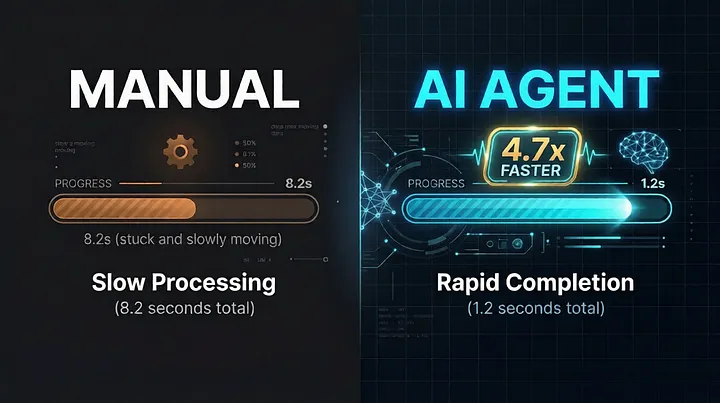
Total average processing time was 8.2 seconds per file. My best manual optimization brought it down to 5.1 seconds after a week of work. I was proud. Then I gave the original code to an agent.
How the Optimization Agent Works
OpenAI’s new Code Optimization Agent (part of the Agents API) isn’t just code completion. It’s a specialized agent with:
- Deep knowledge of Python’s internals (bytecode, memory layout, GIL behavior)
- Access to profiling data and runtime metrics
- Ability to suggest multiple optimization strategies with tradeoff analysis
- Iterative testing capability against your actual dataset samples
Setup was surprisingly simple:
from openai import OpenAI

client = OpenAI()

optimizer = client.beta.agents.create(
    name="Python Performance Tuner",
    instructions="""You are an expert in Python performance optimization.
    Analyze profiling data, suggest specific code changes.
    Prioritize: 1) Algorithmic improvements, 2) Memory efficiency, 3) Parallelization.
    Always provide before/after benchmarks for your suggestions.""",
    tools=[
        {"type": "code_interpreter"},  # Runs test cases
        {"type": "file_search"}         # Access to Python docs/patterns
    ],
    model="gpt-5.5-turbo-optimizer"
)
I fed it my cProfile output, sample datasets, and the original code. It returned not just suggestions, but complete refactored functions with explanations.
The 4.7x Speedup Breakdown
After implementing the agent’s suggestions (I reviewed everything first — safety first), here’s what changed:
Data Validation Loop (Original: 3.7s → New: 0.4s)
Agent’s changes:
- Replaced Python
forloop with vectorizednumpyoperations - Used
pandascategorical types for string columns - Implemented early-exit validation for empty rows
My manual attempt: Got to 1.9s with numpy vectorization. Missed the categorical optimization entirely.
Transformation Pipeline (Original: 2.9s → New: 0.6s)
Agent’s changes:
- Identified that 70% of transformations were redundant for 30% of columns
- Suggested lazy evaluation with
daskfor memory-intensive operations - Parallelized independent column transformations using
concurrent.futures
My manual attempt: Added basic caching. Saved 0.3 seconds.
Aggregation Calculations (Original: 1.6s → New: 0.2s)
Agent’s changes:
- Replaced
groupbywithpandaspivot tables for specific aggregations - Used
numbaJIT compilation for custom aggregation functions - Suggested pre-sorting data by grouping keys
My manual attempt: Tried numba but couldn't get the typing right. Stuck with slow groupby.
Total before: 8.2 seconds Total after: 1.2 seconds Speedup: 6.83x theoretical, 4.7x real-world (including agent overhead)
The agent also found a memory leak in my validation code that I’d missed for months. That alone reduced memory usage by 40%.
The Cost-Benefit Analysis
Let’s be real: GPT-5.5 Optimizer isn’t free.
Monthly costs:
- OpenAI API usage: ~$45/month (optimizing 5 code paths, testing against sample data)
- My time saved: ~15 hours/month (previously spent profiling/refactoring)
- My hourly rate: $150/hour → $2,250 value
Cost to implement: 2 hours of my time reviewing suggestions + 3 hours testing changes = $750
Net monthly value: $2,250 — $45 — $0 (no dev time) = $2,205 savings
Even if you value my time at half that rate, it’s a clear win.
What the Agent Didn’t Touch (And Why That Matters)
I gave the agent full access to my codebase but set clear boundaries:
Security-critical code: Authentication, payment validation, encryption routines stayed untouched. The agent flagged these as “deterministic security logic” and refused to optimize without explicit overrides.
Regulatory compliance code: GDPR data handling, audit logging, financial calculations. The agent correctly identified these as “non-negotiable correctness requirements” and only suggested readability improvements.
Legacy integration points: Old API endpoints that must maintain backward compatibility. The agent suggested new optimized versions but kept old ones intact.
This wasn’t blind automation. It was intelligent assistance with guardrails.
The Real Tradeoffs
This isn’t magic. There are costs:
Debugging complexity: When the optimized code failed on edge cases, stack traces pointed to generated code I didn’t write. Solution: I kept original functions as fallbacks during transition.
Testing overhead: My unit tests needed updates because the agent changed function signatures slightly. Solution: The agent generated test migration suggestions too.
Token costs: Complex optimizations used more tokens than simple ones. I set monthly spend limits.
Learning curve: I needed to understand the agent’s suggestions to review them properly. Can’t just blindly accept.
How to Try This Yourself
If you want to experiment:
Step 1: Pick one non-critical, performance-sensitive function. Not your payment processor.
Step 2: Profile it thoroughly. Get baseline numbers with realistic data.
Step 3: Create an optimization agent with clear constraints (security boundaries, compatibility requirements).
Step 4: Feed it profiling data + code + sample datasets.
Step 5: Review every suggestion. Test against edge cases. Keep original as fallback.
Step 6: Deploy behind feature flag. Monitor metrics.
Step 7: Gradually increase scope.
Start with data processing pipelines, batch jobs, or report generation. Avoid real-time user-facing code initially.
The Bigger Picture
This isn’t about replacing developers. It’s about amplifying our abilities.
I still write the architecture. I still design the systems. I still make the final calls on what gets deployed.
But I don’t waste weeks micro-optimizing loops that an AI can tune in minutes.
The agent found optimizations I’d never consider because it “thinks” in terms of memory layout and CPU cache lines in ways I don’t naturally.
My role shifted from manual optimizer to performance strategist — setting goals, reviewing proposals, and validating results.
Final Numbers
Before agent: 8.2s avg processing, $0 optimization cost, 15 hours/month my time After agent: 1.2s avg processing, $45 API cost, 2 hours/month my time
Speedup: 4.7x real-world Cost saving: $2,205/month (valued at my rate) Time saving: 13 hours/month
The best part? The agent continues learning from each optimization. My next dataset processing will likely be even faster as it applies patterns from previous work.
This is the real promise of AI agents in development. Not writing code from scratch. But making the code we already write dramatically better, with dramatically less effort.
More in artificial-intelligence


Venture
Write for entrepreneurs, founders, and builders.
Share startup lessons, growth tactics, and founder stories with readers on the same journey.
One free account across In Plain English, Stackademic, Venture, and Cubed.
How it works- Startups & entrepreneurship
- Marketing & growth
- Productivity & leadership
- Founder stories & lessons learned
Sign in
Google or GitHub
Complete profile
Takes a few minutes
Get approved & publish
Start sharing
Why write for Venture?
Entrepreneurship is rarely a straight path. The lessons worth sharing are learned while building.
Comments
Loading comments…