What Photo Recovery Means and How to Restore Data from an SD Card
Learn what photo recovery means, why deleted photos may still be recoverable, and how to safely restore data from an SD card without overwriting files.
5 min read
Losing photos from an SD card can feel instant and final. One moment the images are on your camera or phone, and the next they are missing, deleted, or trapped on a card that asks to be formatted.
But photo recovery does not always mean the photos are gone forever. In many cases, deleted or lost images may still exist on the card until new data overwrites them. The key is knowing what to do next, and just as importantly, what not to do.
What Does Photo Recovery Mean?
Photo recovery is the process of finding and restoring image files that are no longer visible through normal folders or camera playback. These files may have been deleted, lost after formatting, hidden by file system errors, or made inaccessible because the SD card became corrupted.
It is important to understand that recovery is not the same as repairing the physical card. If the SD card is cracked, burned, water damaged, or completely undetectable by any device, software may not be enough. But if the card can still be recognized by a computer or card reader, recovery software may be able to scan it for lost photos.
Common Reasons Photos Disappear from an SD Card
Photos can go missing for many reasons, including:
- Accidental deletion
- Formatting the SD card by mistake
- Camera or phone errors
- Removing the card while files are being written
- File system corruption
- Virus or malware issues
- Interrupted transfer between card and computer
- SD card showing as RAW or unreadable
In these situations, the safest first step is to stop using the card immediately. Do not take new photos, copy new files to the card, or format it before recovery.
Why You Should Stop Using the SD Card
When a photo is deleted, the SD card usually marks its storage space as available. The image data may still be there, but once you save new photos or videos, that space can be overwritten.
Once overwritten, recovery becomes much harder or impossible.
So if your photos matter, remove the SD card from the camera, phone, drone, or device and keep it aside until you are ready to recover the data.
How to Restore Photos from an SD Card Safely
Follow this workflow before attempting repairs or formatting.
1. Check Another Device or Card Reader
Sometimes the problem is not the SD card itself. Try inserting the card into another computer, camera, or reliable card reader.
If the card appears normally, copy your photos to a safe location right away. If the card is detected but files are missing or inaccessible, continue with recovery steps.
2. Check Backups and Cloud Sync
Before scanning the card, check whether the photos were backed up elsewhere.
Look in:
- Google Photos
- iCloud Photos
- OneDrive
- Dropbox
- Camera import folders
- External backup drives
If a backup exists, restoring from it is usually the safest option.
3. Avoid Formatting Before Recovery
If Windows asks, “You need to format the disk before you can use it,” do not click Format yet.
Formatting may make the card usable again in some cases, but it can also reduce the chance of recovering your photos. The safer order is:
Recover photos first. Format or repair the card later.
For a more detailed recovery workflow, this SD card recovery explains common SD card data loss situations and recovery methods.
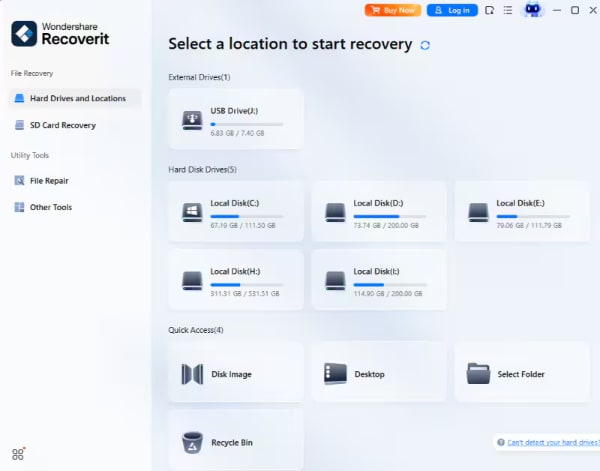
4. Use Photo Recovery Software
If the photos are not backed up and the SD card is still detectable, recovery software can scan the card for lost images.
A tool such as Windows data recovery software can help recover deleted or lost photos from SD cards, USB drives, external hard drives, and other storage devices. This is useful when photos were permanently deleted, lost after formatting, or no longer visible due to file system errors.
When scanning the card, preview recoverable photos if the software supports it. This helps you confirm whether the files are still intact before restoring them.
5. Save Recovered Photos to a Different Drive
Never save recovered photos back to the same SD card during recovery.
Choose another location, such as:
- Your computer’s internal drive
- An external hard drive
- A USB drive
- Cloud storage
Saving files back to the SD card may overwrite other recoverable data.
6. Format or Repair the SD Card Only After Recovery
Once your photos are safely restored, you can decide what to do with the SD card.
If the issue was caused by file system corruption, formatting the card may make it usable again. If errors keep returning, replace the card instead of trusting it with important photos.
A card that fails once may fail again.
When Photo Recovery Software May Not Work
Software recovery has limits. It may not help if:
- The SD card is physically broken
- The card is not detected by any device
- The memory chip is damaged
- New data has overwritten the deleted photos
- The card has severe hardware failure
In these cases, a professional data recovery service may be the better option.
Final Thoughts
Photo recovery means recovering lost image files before they are overwritten or permanently damaged. If your SD card loses photos, the safest approach is simple: stop using the card, avoid formatting, check backups, scan the card, and save recovered files to a different location.
For users who often work with photos, videos, cameras, drones, or memory cards, keeping a reliable recovery option like Recoverit can be useful when accidental deletion or SD card errors happen unexpectedly.
More in technology


Venture
Write for entrepreneurs, founders, and builders.
Share startup lessons, growth tactics, and founder stories with readers on the same journey.
One free account across In Plain English, Stackademic, Venture, and Cubed.
How it works- Startups & entrepreneurship
- Marketing & growth
- Productivity & leadership
- Founder stories & lessons learned
Sign in
Google or GitHub
Complete profile
Takes a few minutes
Get approved & publish
Start sharing
Why write for Venture?
Entrepreneurship is rarely a straight path. The lessons worth sharing are learned while building.
Comments
Loading comments…