10 LangChain & LangGraph Concepts Every AI Engineer Must Master in 2026
8 min readNextGen AI
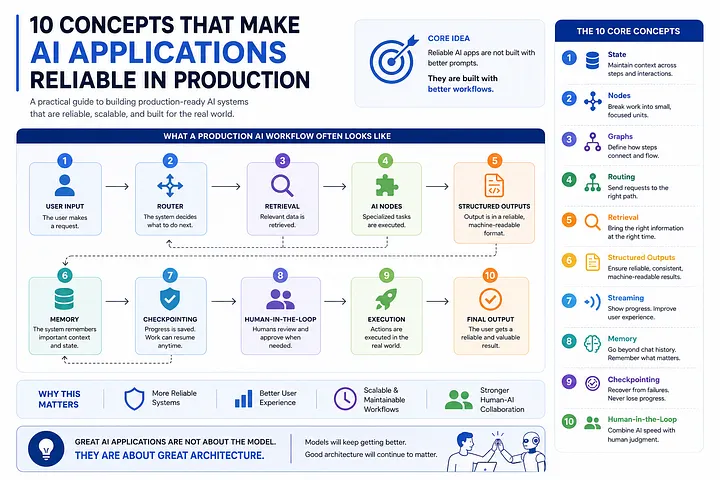
Most AI projects begin with a simple idea.
A user asks a question.
The AI gives an answer.
At first, everything looks great.
The demo works, people are excited, and it feels like the hard part is done.
But once real users start using the application, new challenges quickly appear.
🚨 HIRING: Tech Talent 💰 $50–$120/hr | 🔥 Multiple Roles
Frontend • Backend • Full Stack • Mobile • AI/ML • DevOps 👉 Apply Here
As the application grows, it needs to do much more than answer questions.
It may need to search documents, use external tools, handle errors, decide what to do next, remember previous steps, and sometimes ask a human for approval.
What started as a simple chatbot now becomes a complete workflow.
This is where many AI projects run into problems.
The biggest difference between a simple demo and a real-world AI application is usually not the AI model itself. It’s the system built around it.
LangChain and LangGraph are two popular frameworks that help developers build AI applications that are more reliable, scalable, and easier to manage.
If you’re building AI agents in 2026, these are the concepts worth understanding before creating your next workflow.
1. State Is the Foundation of Every Agent
Why production agents need shared state instead of isolated prompts
Many beginners imagine an AI agent working like this:
User Input
    ↓
LLM
    ↓
Response
Real-world AI agents work very differently.
They keep track of information throughout the entire process instead of treating every step as a new request.
For example, think about a customer support agent:
from typing import TypedDict

class SupportState(TypedDict):
    ticket_id: str
    customer_message: str
    customer_tier: str
    retrieved_articles: list
    sentiment_score: float
    draft_response: str
    escalation_required: bool
    final_response: str
As the process continues, each part of the workflow updates the shared information so the next step knows what has already happened.
{
    "ticket_id": "TKT-9012",
    "customer_message": "My payment failed twice",
    "customer_tier": "Enterprise",
    "retrieved_articles": [
        "Payment Retry Policy",
        "Credit Card Validation"
    ],
    "sentiment_score": 0.91,
    "draft_response":
        "Please retry the payment...",
    "escalation_required": False
}
Without state:
- Agents forget what happened earlier
- Finding and fixing problems becomes harder
- Multi-step workflows can easily break
With state:
- Every step knows what has already happened
- Workflows behave more consistently
- Complex systems become easier to build and manage
You can think of state as the shared memory that keeps your entire workflow connected.
2. Nodes Are Just Functions
The simple building blocks behind AI workflows
Many developers think AI agents rely on some kind of complex or magical system.
But in reality, most nodes are just simple functions.
For example, a retrieval node might:
def retrieve_documents(state):
    docs = vector_store.similarity_search(
        state["user_query"],
        k=5
    )
    return {
        "retrieved_docs": docs
    }
A reranking node:
def rerank_documents(state):
    reranked = reranker.rank(
        query=state["user_query"],
        docs=state["retrieved_docs"]
    )
    return {
        "retrieved_docs": reranked[:3]
    }
Put together:
Retrieve
    ↓
Rerank
    ↓
Generate
    ↓
Validate
Every node is responsible for a single task.
What makes an AI workflow powerful is not complex nodes, but how all the nodes work together to complete a larger process.
3. Chains vs Graphs
Why simple workflows eventually become limiting
Most LangChain projects begin with a simple chain.
One step finishes, then the next step starts.
Everything follows a fixed path, which makes it easy to build and understand at first.
Prompt
   ↓
LLM
   ↓
Parser
   ↓
Response
Chains work great when the workflow is simple and follows a fixed path.
But things get more complicated when you need:
- Multiple AI agents working together
- Different actions based on certain conditions
- Human approval before moving forward
- Automatic retries when something fails
- Tasks that run for a long time
In these situations, simple linear chains can become difficult to manage.
A graph is much better suited for handling this kind of complexity because it can support different paths and decisions naturally.
Router
                │
       ┌────────┴────────┐
       ▼                 ▼
 Research Agent    Support Agent
       │                 │
       └────────┬────────┘
                ▼
         Final Response
Real-World Example
Imagine an ERP migration assistant.
It might need to:
- Analyze project requirements
- Create test cases
- Check whether all requirements are covered
- Send specific issues to the right specialists
- Ask for human approval before important changes
This isn’t a simple step-by-step process.
Different tasks may happen at different times, and the workflow may need to take different paths based on the situation.
That’s why a graph-based workflow is a much better fit than a linear chain.
As AI systems become more advanced, graphs become increasingly important.
4. Routing Beats Giant Prompts
Why specialized agents often work better than one big assistant
One of the most common mistakes in AI development is trying to solve everything with a single huge prompt.
You are a billing specialist,
technical support engineer,
sales representative,
product expert,
and compliance advisor...
This approach usually doesn’t work well as the system grows.
A better option is to route requests to the right agent.
def classify_request(state):
    query = state["user_query"]
        if "billing" in query:
            return "billing_agent"
        if "error" in query:
            return "technical_agent"
        if "pricing" in query:
            return "sales_agent"
        return "general_agent"
Workflow:
User Request
      │
      ▼
    Router
      │
 ┌────┼────┐
 ▼    ▼    ▼
Tech Billing Sales
5. Retrieval Is More Than Vector Search
Building better RAG systems with retrieval, reranking, and filtering
Many developers assume that RAG is simply:
Vector Search
      ↓
LLM
      ↓
Answer
This is good enough for simple demos.
But real-world applications need a few extra steps to get better results.
Retrieve
    ↓
Rerank
    ↓
Filter
    ↓
Generate
Example:
docs = vector_store.search(
    query,
    k=20
)
reranked_docs = reranker.rank(
    query,
    docs
)
top_docs = reranked_docs[:5]
Why reranking is important
A vector database might find 20 documents that seem relevant.
But only a few of them may actually contain the information you need.
Reranking helps bring the most useful documents to the top, which leads to better answers.
Real-World Example
Imagine a company knowledge base with millions of documents.
Before sending information to the LLM, the system may use:
- Hybrid search
- Metadata filtering
- Reranking
- Context compression
These steps help make sure only the most relevant information reaches the model.
The best RAG systems focus on retrieval first and AI generation second.
6. Structured Outputs Prevent Costly Failures
Why production systems should avoid relying on free-form text
Almost every AI engineer has run into this situation:
Prompt:
Return valid JSON.
Response:
{
  "priority": "high"
  "category": "billing"
}
A small formatting mistake can break everything.
The parser fails, and the entire workflow stops working.
That’s why structured outputs are a much safer option.
from pydantic import BaseModel

class TicketClassification(BaseModel):
    category: str
    severity: str
    assigned_team: str
    confidence_score: float
Generate validated output:
result = llm.with_structured_output(
    TicketClassification
).invoke(ticket_text)
Output:
{
  "category": "Payment",
  "severity": "High",
  "assigned_team": "Billing",
  "confidence_score": 0.94
}
Structured outputs make AI applications much more reliable.
If AI-generated data is being used by another system, using a defined schema should be a requirement, not an option.
7. Streaming Improves User Experience
Making AI applications feel faster
People don’t like staring at a blank screen while waiting for a response.
Imagine these two situations.
Experience A
You wait 15 seconds.
Nothing appears on the screen.
Experience B
The answer starts showing up right away, even though it still takes 15 seconds to finish.
Most users prefer the second experience.
Streaming makes this possible by showing the response as it’s being generated.
for chunk in model.stream(prompt):
    print(chunk)
For larger workflows:
yield "Analyzing requirements..."
yield "Retrieving documents..."
yield "Generating response..."
yield "Validating results..."
yield final_response
Real-World Example
Imagine an AI system that needs to generate hundreds of migration test cases.
Showing progress updates while the work is happening can make the experience feel much better for users.
In many cases, how fast a system feels is just as important as how fast it actually is.
8. Memory Is More Than Conversation History
The difference between chatbots and true AI agents
When most developers hear the word memory, they think about chat history.
messages = [...]
Real AI agents need more than just conversation history.
They need memory that helps them keep track of actions, decisions, and ongoing tasks.
For example, think about a coding agent:
{
    "repository": "payments-api",
    "modified_files": [
        "payment.service.ts",
        "retry.handler.ts"
    ],
    "failed_tests": [
        "payment_retry.spec.ts"
    ],
    "last_fix_attempt": "...",
    "pull_request_url": "..."
}
The agent keeps track of things like:
- Previous decisions
- Results from tools
- Failed attempts
- Retrieved information
- The current state of the repository
This helps the agent make better decisions as it continues working.
Memory turns separate interactions into a connected and intelligent workflow.
9. Checkpointing Enables Long-Running Workflows
How AI systems recover from failures and interruptions
In real-world applications, failures are unavoidable.
Models can time out.
APIs can become unavailable.
Sometimes humans need extra time to review and approve results.
Without checkpointing:
Failure
   ↓
Restart Workflow
With checkpointing:
Failure
   ↓
Resume Workflow
Example:
from langgraph.checkpoint.memory import MemorySaver

checkpointer = MemorySaver()
graph = workflow.compile(
    checkpointer=checkpointer
)
Resume later:
graph.invoke(
    input_data,
    config={
        "thread_id": "loan-123"
    }
)
Real-World Example
Think about a loan approval process:
Document Collection
        ↓
Checkpoint
        ↓
Risk Assessment
        ↓
Checkpoint
        ↓
Human Approval
        ↓
Final Decision
The process may take several hours or even days to complete.
Checkpointing helps save progress along the way, so the workflow can continue from where it stopped instead of starting over.
10. Human-in-the-Loop Is the Real Future of AI
Why the best AI systems work with humans instead of replacing them
Many people assume AI agents should handle everything on their own.
But in real-world business applications, human review and approval are often necessary.
Example
def approval_node(state):
  if state["risk_score"] > 0.8:
          return "human_review"
     return "auto_approve"
Workflow:
AI Analysis
      ↓
Risk Assessment
      ↓
Human Review
      ↓
Continue Workflow
Real-World Examples
Human review is often required in areas such as:
- Loan approvals
- Legal contract reviews
- ERP migration validation
- Healthcare recommendations
- Financial audits
The most effective AI systems don’t replace people.
Instead, they help people make better and faster decisions.
Bringing It All Together
A real-world AI workflow often looks something like this:
User Request
      │
      ▼
Routing Node
      │
 ┌────┴─────┐
 ▼          ▼
Research   Support
 Agent      Agent
      │
      ▼
Retrieve Documents
      │
      ▼
Rerank Results
      │
      ▼
Generate Draft
      │
      ▼
Structured Output
      │
      ▼
Checkpoint
      │
      ▼
Human Approval
      │
      ▼
Final Response
One thing stands out.
There isn’t one massive prompt trying to handle every task.
Instead, the system is made up of smaller components, each responsible for a specific job.
Together, they create a reliable and scalable AI workflow.
That’s the foundation of modern AI engineering.
Final Thoughts
One of the biggest lessons I’ve learned from building AI applications is this:
Great AI systems are rarely defined by the model alone.
What really matters is how the workflow is designed.
State.
Nodes.
Graphs.
Routing.
Retrieval.
Structured outputs.
Memory.
Checkpointing.
Human review.
These concepts usually have a much bigger impact on your AI application than constantly changing prompts.
AI models will keep getting better.
But good architecture will always matter.
If you’re building AI agents in 2026, focus on understanding these concepts before anything else.
Thank you for being part of the community.
More in artificial-intelligence


Venture
Write for entrepreneurs, founders, and builders.
Share startup lessons, growth tactics, and founder stories with readers on the same journey.
One free account across In Plain English, Stackademic, Venture, and Cubed.
How it works- Startups & entrepreneurship
- Marketing & growth
- Productivity & leadership
- Founder stories & lessons learned
Sign in
Google or GitHub
Complete profile
Takes a few minutes
Get approved & publish
Start sharing
Why write for Venture?
Entrepreneurship is rarely a straight path. The lessons worth sharing are learned while building.
Comments
Loading comments…